Search This Blog

Showing posts with label extend. Show all posts

Friday, June 1, 2018

How to access and manipulate a custom ASP.NET user control from a Controller in a Module project


We have updated our How to: Show a Custom Data-Bound Control in an XAF View (ASP.NET) tutorial with more information on how to pass external data to custom Web user controls

Previously, our customers had the following difficulties with this task:

- In which project to create web user controls. By default, ASP.NET suggests doing this in the YourSolution.Web project. Adding an *.ASCX control into the YourSolutionName.Module.Web project led to errors.

- How to deal with circular references when attempting to reference the YourSolution.Web project from a Controller defined in the YourSolutionName.Module.Web project.
- How to pass an IObjectSpace, XafApplication or current View object to a custom user control.


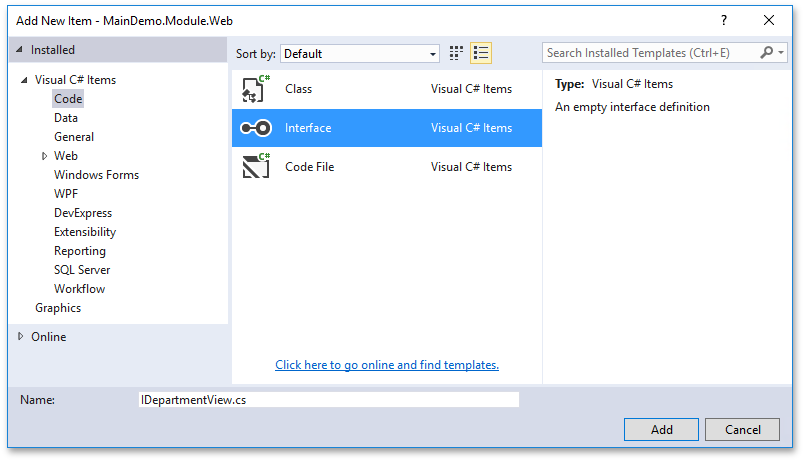
A common way to resolve such a dependency (unrelated to XAF itself) is to define an interface within your class library (a XAF module project) and implement it by using your custom user control.


Monday, November 27, 2017

How to show Color Swatches for the Bezier skin and persist the user choice in XAF WinForms apps

If you are a fan of the new SVG Bezier skin, our WinForms components received in v17.2, do not miss the XAF integration on the subject:

https://www.devexpress.com/kb=T579152

Both theWinForms and XAF teams are looking forward to hearing from you on this new feature. Learn more about this major release from our What's New documents.


Thursday, June 22, 2017

How to display another web site or custom HTML inside IFRAME embedded into an XAF View

I would like to share links to the solutions for ASP.NET WebForms apps allowing you to display arbitrary HTML content in XAF Views. For instance, one may want to use it to display HTML emails in a DetailView or load a complete third-party web site. Take special note that these custom solutions are NOT based on the built-in HTML Property Editor Module and its ASPxHtmlPropertyEditor that uses the DevExpress ASPxHtmlEditor control.

The T178588 ticket describes a very basic solution for displaying a static URL within a DetailView.
The T180499  ticket provides a more complex solution where HTML content is loaded dynamically from a business class property.


Both solutions are based on a very popular way to integrate custom controls in XAF - custom View Items. A custom ViewItem is often preferred over a custom PropertyEditor when you just need to display data without editing and other capabilities. Of course, you can choose from more integration options based on your exact business requirements: Concepts > UI Construction > Using a Custom Control that is not Integrated by Default.

It would be great to hear about whether you experienced similar scenarios and which solutions you are using for them in your Web app. Please let me know in comments to this post. Thanks.

P.S.
While we are at it, it is worth noting that we do not support displaying an XAF Web app inside an IFRAME element by default.

Friday, December 30, 2016

A WinForms example for collapsing/expanding layout groups and persisting their state


As you probably know, the New Web UI was recently enhanced with built-in options for this scenario. Today, I have updated the https://www.devexpress.com/kb=S135134 thread with a WinForms solution:


Please don't hesitate to write to us about each use case scenario that requires additional code to adjust the layout controls to better meet your business needs. My team and I will be more than happy to research them and see how to manage this situation better at the XAF or DevExpress component level. For instance, here we are thinking about providing platform-agnostic Application Model extensions for managing this task for Windows and the Web.

Monday, July 6, 2015

How to easily register many predefined reports using the ReportsV2 module

I wanted to repost a solution for a scenario logged by our old customer Mario Blataric in the past:

"...Also, there is one more thing - report registration. Currently, every V2 report needs to be registered in Module.cs. That's also fine for 10-20 reports, but when you have 1000 lines of code for just registering reports ... not fun.
Give Report properties like Caption, IsInPlace, AutoRegister and other required properties and just do registration automagically if AutoRegister = true (if for some reason someone wants to add report which doesn't want to be accessible through Reports class). "


Here is a possible solution description from the corresponding Support Center ticket:

While in XAF we cannot add new properties like Caption, Category, IsInplace, ParametersObjectType to the base XtraReport class from our shared DevExpress XtraReports library (essentially because these properties will have meaning only in XAF solutions and will not make much sense in non-XAF applications), 
it is possible to implement a custom .NET code attribute with all the required options:

Tuesday, March 24, 2015

Google Maps integration in XAF Web UI - Looking for real use-cases!

UPDATED:
We've implemented the new Web Map Module in v15.2 based on the great customer feedback we received from this post. Refer to the XAF - Web Map Module (Coming soon in v15.2) article for more details.
===
We had a few requests from our users on this subject, and some time ago we described two possible integration options (a custom ListEditor and PropertyEditor) in the T195734: How to use Google Maps in XAF ASP.NET application ticket. There is nothing special here as these approaches are already well-known from XAF documentation: Using a Custom Control that is not Integrated by Default

In addition to the implementation instructions, there was a sample project that should have helped you get all the pieces of the puzzle together. It was not complete implementation by any means (some scenarios were not implemented intentionally), but rather a demonstration of how that is possible in general with an intent for users to further extend and test this solution according to your exact business requirements and Google Maps API docs :-).

Unfortunately, there was not much interest and feedback from users on this basic implementation and, more importantly, on their business requirements, nor on the info on how the Google Maps component helps end-users do their work easier. We require this essential information in order to investigate whether or not it is possible to provide a universal and useful solution for this scenario as part of the standard framework delivery.

This blog post is one more attempt to collect this information from you, guys, I greatly appreciate your input in advance. I am also writing this because I've recently extended the original example implementation by supporting a few more things, which I think the majority would want to have by default. These are: opening geo point details in DetailView after clicking on it within a a map, the possibility to not only display a point's information in detail form, but also to edit its details when we are in the Edit mode with the help of ASPxObjectPropertyEditor. I demonstrated the latest features in the video below:


Unable to display content. Adobe Flash is required.


If you faced a requirement to use Google Maps or any other similar map control to better meet the needs of your clients, I would greatly appreciate it if you email me at dennis@devexpress.com and tell the details of your real use-cases along with the screenshots, videos and other info. 
To formalize this a bit and make it easier for you to answer (and for us to process too), see the four simple points:

Wednesday, January 21, 2015

Simplifying integration of custom controls bound to data from XAF application database - YOUR FEEDBACK IS NEEDED

Scenario


We are researching options to make it easier for our users to achieve the subject in the next version. One of the popular scenarios we were aware of from our users was integration of custom controls, often created in Visual Studio using the standard WinForms or ASP.NET WebForms approaches, and primarily designed for presenting data from the XAF application database in some very custom manner so that built-in XAF Property Editors  or List Editors were not good for this. For instance, you might want to show a list of records in a fancy grid with cards, image gallery or other controls or modes not integrated by default.


Current solutions and problems

XAF is very extensible framework and offers many ways of integrating custom or third party controls. We noticed that while doing so, feeding these custom controls with data from the application database was often a challenge for our users. This binding is done automatically for built-in forms and data editors, but requires writing some code that will read data via the IObjectSpace.GetObjects<T> method (to respect data security filters) and also listen to the IObjectSpace.Reloaded and other events to handle data updates. Finally, designing a data bound user control in Visual Studio often implies a direct connection to the database or using specialized data sources (e.g., to generate a list of grid columns or pivot fields), which do this for you. The latter forces you to think about obtaining an application connection string at design time, while this dynamic part is changed later in the most cases. Add to this different approaches for Entity Framework and XPO and you will get the whole picture.

New solutions (not yet built-in!)

Briefly, we decided to simplify this scenario. Here are two videos that shows one possible option:

ASP.NET:  http://www.screencast.com/t/OHhcHD9vy

WinForms: http://www.screencast.com/t/8M8K4eskkYO9

How it works?


In short, the proposed flow is as follows:

Wednesday, May 29, 2013

Discussing custom forms and controls (again)

I recently updated the E911 example to 13.1 (it was very smooth, btw - only one change from IComplexPropertyEditor to IComplexViewItem) and refactored it a bit (improved some code, added more code comments and fully rewrote the description).

I think that you may be interested in checking this updated example (I reposted its description below), because it may help you better understand ideas behind XAF as well as how it works and is built internally.

In addition, I recommend you check out the following help articles in the XAF documentation:

eXpressApp Framework > Concepts > UI Construction
eXpressApp Framework > Concepts > UI Construction > UI Element Overview
because they should give you a better understanding of reusable XAF building blocks and see how to customize or replace them.

==========================
This example implements the following scenarios when an end-user clicks on a custom item in the navigation control:
- a custom non-XAF form is opened as a result;
- a standard XAF View containing a custom user control is opened as a result.
Both custom form and user controls display persistent data from the XAF application database:


To accomplish this, you can follow the instructions below:

1. Define a base structure of the navigation control in your XAF application, as shown in the E911.Module\Model.DesignedDiffs.xafml file.
You can simply copy and paste the contents of the NavigationItems element into the corresponding file (pre-opened via the text editor) of your platform-agnostic module.
The same customizations can be achieved via the Model Editor visually.

This navigation structure will be further customized in the WinForms and ASP.NET executable projects later.

2. Intercept events of the navigation control to display a custom form when a custom navigation item is clicked.
To do this, implement a WindowController into your platform-agnostic module and handle events of the ShowNavigationItemController class as per the E911.Module\Controllers\ShowCustomFormWindowController.xx file. This controller will be abstract and be overridden in WinForms and ASP.NET modules.

3. Declare a custom ViewItem class that is supposed to host a custom user control in the standard XAF View. To do this, implement a custom ViewItem descendant and related types in the platform-agnostic module as shown in the E911.Module\Editors\CustomUserControlViewItem.xx file.
This ViewItem will also be abstract and platform-agnostic as it will not create platform-dependent controls, and will just provide a common customization code for both platforms. For instance, the OnControlCreated method will be overridden to bind the created control to data. To access persistent data from the database used by an XAF application, the ViewItem will implement the IComplexViewItem interface that consists of a single Setup method, receiving the IObjectSpace and XafApplication objects as parameters.
To unify our data binding code for both platforms, the IXpoSessionAwareControl interface and an auxiliary XpoSessionAwareControlInitializer class are introduced.
The interface provides a single UpdateDataSource method that is implemented by custom forms and user controls to bind them to data received by means of XPO.
You can use a similar mechanism and modify these auxiliary types to pass other custom data into your custom forms and controls.

4. Define a base structure of the standard XAF View with a custom ViewItem as shown in the E911.Module\Model.DesignedDiffs.xafml file.
You can simply copy and paste the contents of the Views element into the corresponding file (pre-opened via the text editor) of your platform-agnostic module.


5. Create custom forms and user controls in WinForms and ASP.NET executable projects analogous with what is shown in the example. The easiest way to do this is to copy the contents of the E911.Win\Controls and E911.Web\Controls folders and then include the necessary files into your solution. Take special note that these custom forms and controls implement the IXpoSessionAwareControl interface to automatically receive persistent data and other parameters when they are created.


6. Implement platform-dependent behavior to open and customize custom forms and controls. To do this, copy the following files into your WinForms and ASP.NET module projects:
WinForms:
E911.Module.Win\Controllers\WinShowCustomFormWindowController.xx - contains an WinForms version of the WindowController, which is inherited from the platform-agnostic
E911.Module.Win\Editors\WinCustomUserControlViewItem.xx - contains an WinForms version of the ViewItem, which is inherited from the platform-agnostic one;
E911.Module.Win\WinModuleEx.xx - contains a registration code for WinForms version of the ViewItem;
one;

ASP.NET:
E911.Module.Web\Editors\WebCustomUserControlViewItem.xx - contains an ASP.NET version of the ViewItem, which is inherited from the platform-agnostic one;
E911.Module.Web\WebModuleEx.xx - contains a registration code for ASP.NET version of the ViewItem;
E911.Module.Web\Controllers\WebShowCustomFormWindowController.xx - contains an ASP.NET version of the WindowController, which is inherited from the platform-agnostic one;

These platform-dependent versions of the WindowController and ViewItem are required to implement the creation and display of custom forms and controls using the means specific for each platform. They are also designed to provide the capability to be able to set custom forms and control settings via the Model Editor. For that purpose, custom Application Model extensions are implemented for the Navigation Item and View Item model elements.

7. Set the custom forms and controls settings for each platform.
To do this, copy the contents of the E911.Win\Model.xafml and E911.Web\Model.xafml files into the Model.xafml file in the executable WinForms and ASP.NET projects:
WinForms:


ASP.NET:


That is it.

IMPORTANT NOTES
1. It is also possible to mix the traditional and XAF development approaches (consult our Support Team if you are not sure how to integrate your standard non-XAF solution into XAF), because an XAF application is a regular .NET application built of reusable blocks like View, ViewItem, Property and List Editors, etc. that eventually create and customize platform-dependent controls exactly the same way you do this without XAF. So, using XAF does not mean something absolutely new and allows you to reuse your existing development skills and practices. Of course, it is possible to create your own reusable blocks if the standard ones do not meet your needs. For instance, the example of a custom View class designed to show a custom form can be found on CodeProject here.

2. This solution contains some generic code (e.g., base WindowController and ViewItem) that is mainly required because our XAF application is for both Windows and the Web. You may avoid this generic code and make a simpler implementation if you are developing for only one platform.

3. You can display custom forms not only when interacting with the navigation control, but from any other place. To do this, intercept the events of a required entity, e.g., an XAF Controller, Action or a View. Refer to the product documentation or consult with our Support Team in case of any difficulties.

4. By default controls layout and user customizations are preserved only for built-in XAF ListEditors, because they have special code for that. If you embed a custom user control into XAF, you need to preserve its settings yourself as well, exactly like you would do when implementing this task in the "old way" in a non-XAF application. Refer to the control's documentation to learn more on how to accomplish this task.
Feel free to contact the respective product team if you experience any difficulties customizing this control.