In
server modes, grid controls perform operations like sorting, grouping, filtering, etc. on the data store side to guarantee the best performance. Thus, columns bound to non-persistent properties (their values exist only in the client memory at runtime) cannot be used for such server-based operations and can cause exceptions (
learn more...). Some of them can be detected only in the end application after navigating to a problematic grid at runtime.
With XAF
16.2.6, to prevent these situations, we have improved column creation logic in our
Grid List Editors for Windows and the Web. In particular, we have disabled all server-based operations (sorting, filtering, grouping) for non-persistent properties in the ASP.NET WebForms ASPxGridListEditor and WinForms GridListEditor when
DataAccessMode = Server or InstantFeedback.
Technically, it means the following:
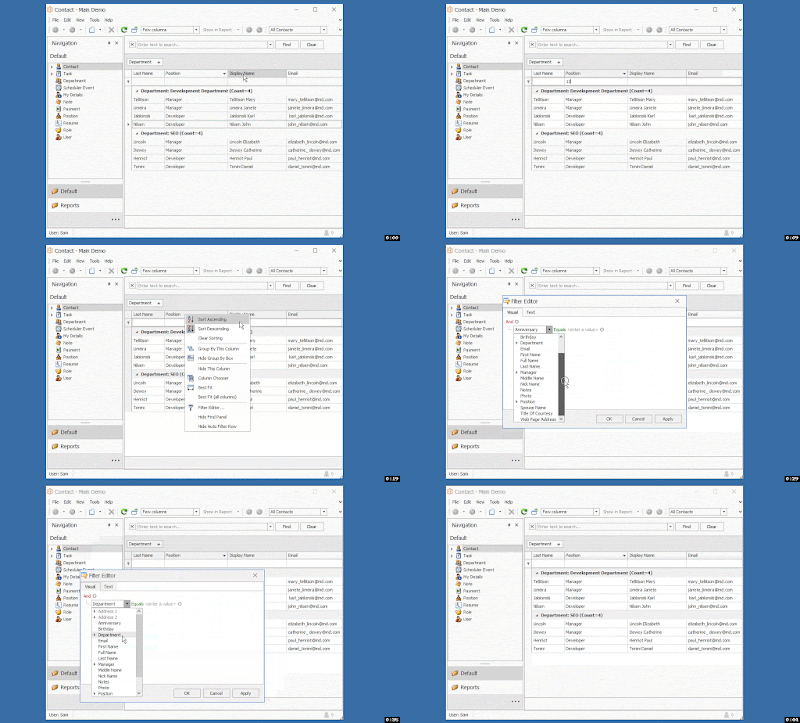
1) The grid's Find Panel does not take non-persistent properties into account.
2) The grid's Filter Editor does not display non-persistent properties in the properties tree.
3) The grid's Auto Filter Row feature is not available for non-persistent columns.
4) Grid column headers for non-persistent columns do not allow end-users to filter, sort, group.
See this video recorded from the WinForms version of our MainDemo:
Take special note that in XPO, calculated non-persistent properties defined using
PersistentAliasAttribute or
CalculatedAttribute can still be used without problems for server-based operations as previously. The only PersistentAlias attribute scenario, which may still not lead to disabled server-side operations, is when you have an aliased reference property and a grid column with a complex property path like:
YourPersistentAliasReferenceProperty.SomeNestedProperty1.SomeNestedPropertyN.
Such properties will be treated as regular non-persistent properties for now or you can disable our improvement using the feature toggle below.
For EF, calculated properties defined using
CalculatedAttribute are still unsupported and treated as regular non-persistent properties mentioned above.
I do not need this behavior. How do I disable it?
With
v16.2.7 (or,
after installing this hot fix), you can set the
PreventServerSideOperationsForNonPersistentMembers property of the
DevExpress.ExpressApp.Editors >
ColumnsListEditor class to
False in the overridden OnActivated method of a custom ViewController for a required ListView. Refer to the following example:
[C#]
using DevExpress.ExpressApp;
using DevExpress.ExpressApp.Editors;

namespace MainDemo.Module.Controllers {
    public class S31714_FeatureToggle : ViewController<ListView> {
        protected override void OnActivated() {
            base.OnActivated();
            ColumnsListEditor columnsListEditor = View.Editor as ColumnsListEditor;
            if(columnsListEditor != null) {
                columnsListEditor.PreventServerSideOperationsForNonPersistentMembers = false;
            }
        }
    }
}
[VB.NET]
Imports DevExpress.ExpressApp
Imports DevExpress.ExpressApp.Editors

Namespace MainDemo.Module.Controllers
    Public Class S31714_FeatureToggle
        Inherits ViewController(Of ListView)

        Protected Overrides Sub OnActivated()
            MyBase.OnActivated()
            Dim columnsListEditor As ColumnsListEditor = TryCast(View.Editor, ColumnsListEditor)
            If columnsListEditor IsNot Nothing Then
                columnsListEditor.PreventServerSideOperationsForNonPersistentMembers = False
            End If
        End Sub
    End Class
End Namespace


