Search This Blog

Showing posts with label grid. Show all posts

Friday, September 1, 2017

Focusing the newly added grid column in the Column Chooser dialog of the WinForms GridListEditor

Has anybody noticed this small improvement in XAF v17.1.5 (added as per this customer request)?
If not, check out this video to see what I am referring to:


Hopefully, this will help eliminate extra time when scrolling and searching for your end-users, especially if there are many-many columns.


We've not yet enabled this by default in DetailView and look forward to hearing your thoughts on this.

Wednesday, March 29, 2017

Improving UX with Grid List Editors by disabling ALL unsupported operations for non-persistent columns in server modes (XAF v16.2.6) - YOUR FEEDBACK IS NEEDED!

In server modes, grid controls perform operations like sorting, grouping, filtering, etc. on the data store side to guarantee the best performance. Thus, columns bound to non-persistent properties (their values exist only in the client memory at runtime) cannot be used for such server-based operations and can cause exceptions (learn more...). Some of them can be detected only in the end application after navigating to a problematic grid at runtime.


With XAF 16.2.6, to prevent these situations, we have improved column creation logic in our Grid List Editors for Windows and the Web. In particular, we have disabled all server-based operations (sorting, filtering, grouping) for non-persistent properties in the ASP.NET WebForms ASPxGridListEditor and WinForms GridListEditor when DataAccessMode = Server or InstantFeedback. 

Technically, it means the following:
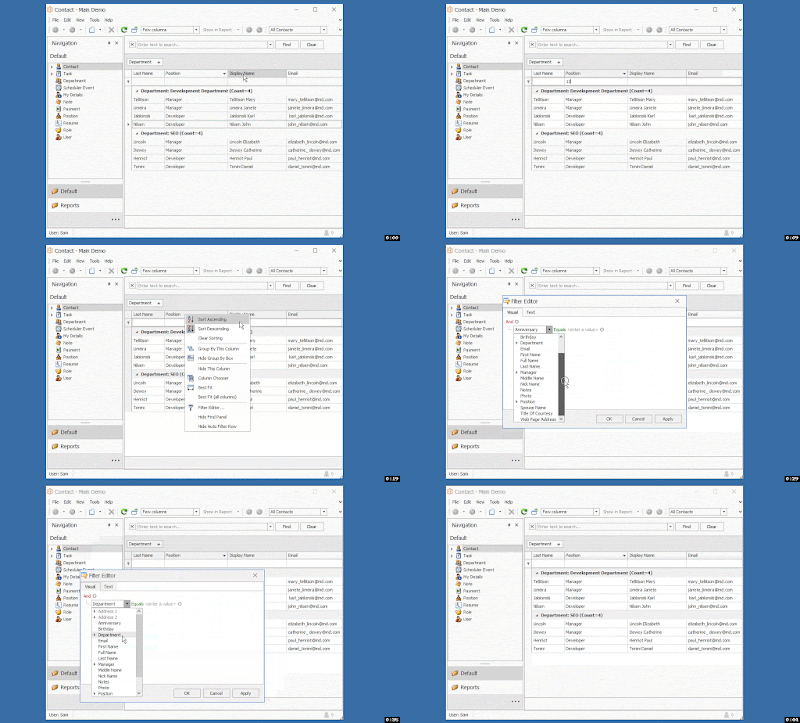
    1) The grid's Find Panel does not take non-persistent properties into account.
    2) The grid's Filter Editor does not display non-persistent properties in the properties tree.
    3) The grid's Auto Filter Row feature is not available for non-persistent columns.
    4) Grid column headers for non-persistent columns do not allow end-users to filter, sort, group.


See this video recorded from the WinForms version of our MainDemo:

Take special note that in XPO, calculated non-persistent properties defined using PersistentAliasAttribute or CalculatedAttribute can still be used without problems for server-based operations as previously. The only PersistentAlias attribute scenario, which may still not lead to disabled server-side operations, is when you have an aliased reference property and a grid column with a complex property path like:
YourPersistentAliasReferenceProperty.SomeNestedProperty1.SomeNestedPropertyN.
Such properties will be treated as regular non-persistent properties for now or you can disable our improvement using the feature toggle below.
For EF, calculated properties defined using CalculatedAttribute are still unsupported and treated as regular non-persistent properties mentioned above.

I do not need this behavior. How do I disable it?
With v16.2.7 (or, after installing this hot fix), you can set the PreventServerSideOperationsForNonPersistentMembers property of the DevExpress.ExpressApp.Editors > ColumnsListEditor  class to False in the overridden OnActivated method of a custom ViewController for a required ListView. Refer to the following example:

[C#]
using DevExpress.ExpressApp; using DevExpress.ExpressApp.Editors; namespace MainDemo.Module.Controllers { public class S31714_FeatureToggle : ViewController<ListView> { protected override void OnActivated() { base.OnActivated(); ColumnsListEditor columnsListEditor = View.Editor as ColumnsListEditor; if(columnsListEditor != null) { columnsListEditor.PreventServerSideOperationsForNonPersistentMembers = false; } } } }
[VB.NET]
Imports DevExpress.ExpressApp Imports DevExpress.ExpressApp.Editors Namespace MainDemo.Module.Controllers Public Class S31714_FeatureToggle Inherits ViewController(Of ListView) Protected Overrides Sub OnActivated() MyBase.OnActivated() Dim columnsListEditor As ColumnsListEditor = TryCast(View.Editor, ColumnsListEditor) If columnsListEditor IsNot Nothing Then columnsListEditor.PreventServerSideOperationsForNonPersistentMembers = False End If End Sub End Class End Namespace

Thursday, March 2, 2017

ASPxGridView/ASPxGridListEditor + Server Mode + Select All = ?

I want to pay your attention to this Support Center ticket describing a recent fix for our ASPxGridListEditor, which is a wrapper over the ASPxGridView component as you know.

It is a known and pretty logical Server Mode limitation that the selection of ALL grid rows using the built-in SelectAll check box is NOT supported in this mode. That is because this particular operation defeats all server mode benefits = causes loading the whole data source into the web server memory...

Our ASPxGridListEditor did not manage the "Select All" header cell visibility prior to v16.2.4. We have corrected this mistake and now this button is hidden in server mode by default (SelectAllCheckboxMode = None). The "Select All" button is still available in Client and DataView modes only (SelectAllCheckboxMode = AllPages), though.


If you want, you can implement a custom Controller from the ticket to enable selection of all records on the currently active page only when DataAccessMode = Server (we did not follow this route in the XAF code, because it would be more confusing and even damaging for users who got used to this command). Alternatively, you can set DataAccessMode = Client/DataView  for a required ListView node using the Model Editor (of course, it you do not have many data records).


If these solutions do not help, please describe your real life use-case scenario where this SelectAll feature is needed when grid is operating in server mode. It is possible that we have an alternative and even better technical solution for you, e.g. like we did for Reinhold and his reporting scenario.


Tuesday, May 24, 2016

WinForms GridListEditor - How to restore values in the auto filter row

I wanted to inform you of a recent solution update for this task, which will help you restore auto filter row values for reference properties as well (previously, there might be an exception). The main change is in wrapping the GridView.GuessAutoFilterRowValuesFromFilter call into the using(var criteriaScope = View.ObjectSpace.CreateParseCriteriaScope()) {...} construction, which relies on the smart DevExpress.Data.Filtering > CriteriaOperator > UserValueParse event  handling inside our XPO/EF core libraries

using System;
using DevExpress.XtraGrid;
using DevExpress.ExpressApp;
using DevExpress.XtraGrid.Views.Grid;
using DevExpress.ExpressApp.Win.Editors;

namespace MainDemo.Module.Win {
    public class B152594 : ViewController<ListView> {
        GridListEditor gridlistEditor = null;
        protected override void OnViewControlsCreated() {
            base.OnViewControlsCreated();
            gridlistEditor = View.Editor as GridListEditor;
            if(gridlistEditor != null) {
                gridlistEditor.Grid.HandleCreated += Grid_HandleCreated;
            }
        }
        private void Grid_HandleCreated(object sender, EventArgs args) {
            GridControl grid = (GridControl)sender;
            grid.HandleCreated -= Grid_HandleCreated;
            using(var criteriaScope = View.ObjectSpace.CreateParseCriteriaScope()) {//!!!
                ((GridView)grid.MainView).GuessAutoFilterRowValuesFromFilter();
            }
        }
    }
}

After you modify the filter either by manually typing values in the topmost grid row or visually via the filter builder and reopen the form, there will be the following result in the UI:


I think your end-users will appreciate this functionality and I would be grateful to hear from you on how this works in your apps and whether there are any uncovered scenarios. Thanks! 

Thursday, April 14, 2016

Improving usability with regard to the ImmediatePostData functionality in GridListEditor (WinForms)

As you perfectly know from my recent posts:-), one of our team OKRs was and still is "improving developer experience when accomplishing common tasks". In this blog post, I am going to cover one more small, but important improvement in XAF v15.2.10+ that adds to this larger goal:


In short, the previous custom-tailored solution is no longer required, as the corresponding code has been moved to the standard delivery. You can see the result in this short video.


Not to cause breaking changes a minor 15.2 version, you can activate this behavior in an editable GridListEditor via the static ImmediatePostDataSupportEnabled option. 
...
namespace MainDemo.Win {
    public class Program {
        [STAThread]
        public static void Main(string[] arguments) {
 DevExpress.ExpressApp.Win.Editors.GridListEditor.ImmediatePostDataSupportEnabled = true;
...
The ImmediatePostDataSupportEnabled option has its default value set to True by default in v16.1.

Thursday, September 17, 2015

How to enable the Conditional Formatting feature of the WinForms GridControl in the XAF GridListEditor and preserve ListView formatting settings between runs?

In short, this feature allows your end-user to sort or group the data inside the grid AND to visualize selected cells, rows with data bars, icons and predefined or custom appearance schemes. Refer to the following XtraGrid documentation for more information on this feature: 


In general, accomplishing this task in an XAF app consists of several independent parts:
2. Integrating this solution in the GridListEditor using a ViewController  as described in the Access Grid Control Properties  help topic.
3. Serializing the grid's formatting rules information, taking into account the fact that it uses a different mechanism for storing settings, which is based on the Application Model. In XAF, it is best to extend the ListView node with a string property that will hold a serialization representation of formatting rules. Refer to the How to: Extend the Application Model  article for more details.